


March 15, 2024
Tutorials

Mastering Stop Loss Strategies: How to Utilize Stop Loss on Exchanges
At its core, a stop-loss order instructs the exchange to sell a specified asset when its price falls below a certain threshold. The primary purpose is to minimize losses and protect capital in the event of adverse market movements.
Protect Your Crypto
In the fast-paced world of cryptocurrency trading, knowing how to safeguard your investments is crucial. One such risk management tool that traders swear by is the stop-loss order. In this article, we’ll delve deep into what stop-loss entails, why it’s essential, and most importantly, how to set it up effectively on one of the leading cryptocurrency exchanges, Binance, Kucoin, Bybit or Coinbase.
What is Stop-Loss?
Stop-loss is a risk management technique used by traders to limit potential losses on a trade. It’s like a safety net that automatically executes a sell order when the price of an asset reaches a predetermined level. Essentially, it helps traders mitigate losses by closing out a position before it spirals into significant financial damage.
Importance of Stop-Loss in Trading
Imagine sailing in rough seas without a life jacket – that’s what trading without a stop-loss feels like. With the volatile nature of cryptocurrency markets, having a stop-loss strategy in place is akin to protecting your investment from turbulent waters.
How Stop-Loss Works
Let’s say you’ve bought Bitcoin at $50,000 per coin, but you’re worried about a potential downturn. By setting a stop-loss order at $45,000, you’re essentially saying, “If the price drops to $45,000, sell my Bitcoin automatically.” This ensures that even if the market takes a nosedive, you’re out before things get too dire.
Setting Up Stop-Loss on Binance
Navigating to the Trading Platform. Once you’re logged in, navigate to the trading platform. Binance offers a user-friendly interface with a plethora of trading pairs to choose from.
Accessing Stop-Loss Feature
To set up a stop-loss order, locate the trading pair you’re interested in and click on “Trade.” From there, select “Stop-Limit” order type, and you’ll see options to set your stop price and limit price.
Customizing Stop-Loss Settings – Choosing the Right Stop-Loss Price
Determining the appropriate stop-loss price requires careful consideration of market conditions, technical analysis, and your risk tolerance. Setting it too close to the entry point may result in premature exits, while setting it too far could expose you to substantial losses.
Setting Stop-Loss Percentage
Another approach is to set a stop-loss percentage based on the asset’s volatility. For instance, if you’re trading a highly volatile altcoin, you might opt for a wider percentage range compared to a stable cryptocurrency like Bitcoin.
Choose the Order Type: In most exchanges, you can place a stop-loss order as a “Stop-Limit” or “Stop-Market” order.
-
- Stop-Limit: You set a stop price (e.g., $390) and a limit price (e.g., $385). If the market reaches the stop price, your limit order becomes active to sell your cryptocurrency at the limit price or better. If the market doesn’t reach your limit price, your order may not be executed.
- Stop-Market: You set a stop price (e.g., $390). When the market reaches this price, your cryptocurrency will be sold at the prevailing market price. This type of order guarantees execution but may not guarantee a specific price.
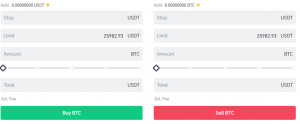
Here is an example of a stop price and limit price.
- Open the Binance app or website and log in to your account.
- Go to the “Spot” trading section.
- Choose a Pair: Find any trading pair you bought (e.g., BNB/USDT).
- Click on “Trade” and then select “Sell.”
- In the “Sell” section, choose “Stop-Limit.”
- Set a Stop-Loss Price: Set the “Stop” price at $390. This is $10 less than your purchase price ($400 – $10 = $390).
- Next, set the “Limit” price. For example, you can set it at $385.
- Enter the amount of BNB you want to sell (ensure it’s the amount you bought).
- Review the details and click “Sell BNB.”
Now, with these settings:
If the BNB price drops to $390, your stop-loss order will be triggered. Once triggered, your BNB will be sold at the limit price you set ($385).
FAQs
What is the difference between stop-loss and take-profit?
Stop-loss and take-profit are both risk management techniques used in trading, but they serve opposite purposes. While stop-loss helps minimize losses by automatically selling an asset at a predetermined price, take-profit locks in profits by automatically selling an asset when it reaches a specified price target.
Can I set multiple stop-loss orders on Binance?
Yes, Binance allows users to set multiple stop-loss orders for different trading pairs simultaneously. This feature enables traders to manage risk across various assets effectively.
Is stop-loss guaranteed to protect against losses?
While stop-loss orders can help mitigate losses in many cases, they’re not foolproof and may not always protect against significant market downturns or sudden price crashes. It’s essential to combine stop-loss orders with other risk management strategies for comprehensive protection.
Should I use stop-loss for all my trades?
Stop-loss orders are a valuable tool for risk management, but whether you should use them for all your trades depends on your trading strategy, risk tolerance, and market conditions. It’s advisable to assess each trade individually and determine whether a stop-loss order is appropriate based on your analysis.
Can stop-loss orders be executed during market closures?
Yes, stop-loss orders on Binance can be executed even during market closures or when trading is temporarily halted. Binance’s automated trading system ensures that stop-loss orders are processed promptly, regardless of market conditions.
That’s it for the stop-loss strategies on centralized exchanges. Stay tuned for more tutorials and news on our crypto airdrops website.


